Partner Sites


Jotron Amplifiers - Creating Beats Inside You
Hi-Fi Public Address Power Amplifiers

Jul 25, 2024

7 Simple Steps to Improve The Battery Life of Your Mac

 Whether you're working on big tasks or taking some time off, productivity depends on keeping your Mac operating effectively. Making sure the battery life on your Mac is optimal is one of the most important things to do to keep things running smoothly. Here are a few doable actions you may do to increase your Mac's battery life.

1. Adjust Screen Brightness

One of the simplest ways to save battery life is to lower your screen brightness. The display is one of the most power-hungry components of your Mac.

  • How to Adjust Brightness:
    • Go to the Apple menu > System Preferences > Displays.
    • Adjust the brightness slider to a lower setting.
    • Alternatively, use the F1 and F2 keys to decrease or increase brightness.

2. Manage Background Applications

Applications running in the background can drain your battery significantly. Ensure you close any unnecessary applications when not in use.

  • How to Manage Applications:
    • Open the Activity Monitor (Finder > Applications > Utilities > Activity Monitor).
    • Check for apps consuming high CPU and memory, and close those you don't need.

3. Enable Energy Saver Settings

Macs come with built-in energy-saving settings that help conserve battery life.

  • How to Enable Energy Saver:
    • Go to System Preferences > Battery > Battery.
    • Check options like "Slightly dim the display while on battery power" and "Enable Power Nap while on battery power".

4. Update macOS and Applications

Keeping your macOS and applications up-to-date ensures that you benefit from the latest performance improvements and bug fixes that can help enhance battery life.

  • How to Update:
    • Go to System Preferences > Software Update.
    • For apps, open the App Store and click on Updates to ensure all your applications are up-to-date.

5. Disable Unnecessary Features

Turning off features that you don’t use can save battery life. Features like Bluetooth and Wi-Fi should be disabled when not in use.

  • How to Disable Features:
    • Click on the Bluetooth icon in the menu bar and select "Turn Bluetooth Off."
    • Go to System Preferences > Network and turn off Wi-Fi when not needed.

6. Optimize Battery Charging

macOS has a feature called "Optimized Battery Charging" that helps reduce the wear on your battery and improve its lifespan.

  • How to Enable:
    • Go to System Preferences > Battery > Battery Health.
    • Check "Optimized Battery Charging."

7. Monitor Battery Health

Regularly checking your battery’s health can help you understand its condition and take necessary actions.

  • How to Check Battery Health:
    • Click on the Apple menu > About This Mac > System Report.
    • Under the Power section, review the battery condition.

     
By following these steps and making small adjustments, you can significantly improve the battery life of your Mac. Not only will this help you stay productive for longer, but it will also extend the overall lifespan of your device.


Oct 19, 2018

Apple now lets US customers download Apple ID account data


Apple believes that privacy is a "fundamental human right" and insists that it doesn't gather your personal information to sell to advertisers or other organizations. While it may or may not collect as much data about its customers as some of its competitors, Apple still knows a lot about its users.
Apple in compliance with the European Union’s General Data Protection Regulation (GDPR) earlier this year launched a portal allowing customers in select regions to download a copy of the data associated with their Apple ID.
At the time, Apple said the service would be available to customers outside of the EU in the “coming months” and now, they’re making good on that promise.
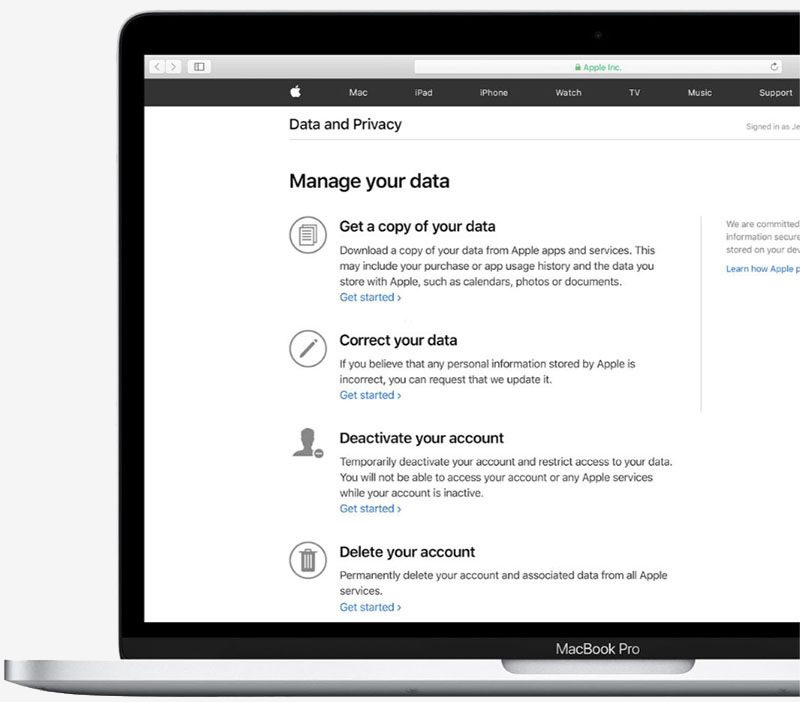
As part of Apple’s updated privacy website, customers in the US, Canada, Australia and New Zealand can now request a copy of the data associated with their Apple ID.
This information can include, but is not limited to, your Apple ID account details and sign-in records, data stored with iCloud such as contacts, notes, calendars, bookmarks, reminders, photos, videos, e-mails and documents, app usage information, a record of items purchased or downloaded from the App Store, Apple Books and iTunes Store as well as your browsing history in the stores, a record of Apple retail store transactions and support and marketing communications.

According to Apple, data that isn’t provided is either in a form that is not personally identifiable or linked to your Apple ID, is stored in an end-to-end encrypted format that Apple cannot decrypt or is simply not stored by Apple at all. Other data may only be held for a short time before being deleted.
To request a copy of your data, sign into your Apple ID account page, scroll down to Data & Privacy and select “Manage your Data and Privacy.” From there, select “Get started” under “Get a copy of your data.”
After completing the request, Apple will organize the data associated with your Apple ID, post it to your account and notify you that it’s ready. You’ll have 14 days to download it, after which time it will be removed and you’ll need to request it again.

Microsoft's latest Windows 10 test build lets you remove more pre-installed apps


Core apps have their place but if you've found a better third-party solution, it becomes redundant to have multiple apps that accomplish the same thing. Being able to remove Microsoft's pre-installed apps - for whatever reason - is a positive.
A vanilla installation of Windows 10 is taking on a whole new meaning with Microsoft’s latest preview build. Windows 10 Insider Preview, Build 18262 (19H1), allows Insiders in the Fast ring and those who have opted in to the Skip Ahead program to delete additional pre-installed apps.
Until now, it was only possible to uninstall Microsoft Solitaire Collect, My Office, OneNote, Print 3D, Skype, Tips and Weather via the context menu on the Start menu All Apps list. In 19H1, Microsoft has added the ability to additionally remove 3D Viewer, Calculator, Calendar, Groove Music, Mail, Movies & TV, Paint 3D, Snip & Sketch, Sticky Notes and Voice Recorder.
While some of these pre-installed apps are incredibly handy, they aren’t universally used by all and the ability to remove them is much appreciated.
Build 18262 also adds a new optional column to the Details tab in Task Manager to show which apps are DPI Aware and implements multiple bug fixes. The full changelog can be found over on Microsoft’s announcement blog.
Microsoft earlier this month paused the rollout of Windows 10 October 2018 Update (version 1809) after reports surfaced that it was deleting user data. The issues have since been rectified and Microsoft is testing a revised update with Windows Insiders ahead of a general re-launch.

Sep 1, 2018

Huawei beats Qualcomm to 7nm with Kirin 980 processor and it's a game changer


Huawei has unveiled its latest SoC at IFA 2018, the Kirin 980. Debuting as the first ever 7nm mobile processor, the chip is stunningly small for packing an array of impressive features.
Based on the ARM Cortex-A76 and Mali-G76, the Kirin 980 also includes a Cat.21 modem to reach speeds of up to 1.4 gigabits per second on cellular networks. As the first mobile SoC paired with 2,133MHz LPDDR4X RAM, the Kirin 980 is going to put up some impressive performance in memory intensive tasks.

Aug 21, 2018

The U.S. Government wants Facebook to break the encryption on Messenger


The United States government wants Facebook to break the end-to-end encryption on its Messenger app in order to snoop on a suspect in an ongoing MS-13 criminal investigation. So far, Facebook has not complied with the request.
While the case itself is under seal in California and therefore no public filings are available, three anonymous sources revealed some of the details to Reuters. The Department of Justice argued in court that Facebook should be held in contempt for failing to comply with the government’s request. Facebook argues that in order to comply, it would have to completely remove encryption from Messenger for all users. Even for an individual person, which is what the government is asking for, Facebook wouldn’t be able to easily remove the encryption.
For clarification, Facebook Messenger is not encrypted end-to-end for normal conversations. However, there is a Secret Conversation feature that allows all messages between two people to be secured where not even Facebook could decrypt it in transit. The MS-13 suspect is likely using this feature to communicate.
If this sounds familiar, a similar thing happened in 2016 after the San Bernardino shooting. The FBI wanted Apple to break into the locked iPhone 5C of Syed Rizwan Farook. A California magistrate judge signed a court order compelling Apple to unlock Farook’s iPhone. Apple fought the court order with CEO Tim Cook writing an impassioned customer letter arguing against what he perceived as government overreach. The FBI eventually dropped the case after using a third party company to break into the phone.
If Facebook complies with the government’s request, then it could set a dangerous precedent. Major tech companies like Apple have been trying to position themselves as privacy and security minded. Facebook in particular is still facing the ramifications after the Cambridge Analytica scandal and Russian interference campaigns. Companies such as Apple, Signal, WhatsApp (which is ironically owned by Facebook), and Telegram pride themselves on offering apps that allow people to securely and privately communicate with each other.
Additionally, Facebook will likely face the wrath of President Trump given his proclivity for using MS-13 as an example of the problems with America’s immigration system.
According to the Reuters article, legal experts say the government must “meet a high legal standard when seeking to obtain phone conversations, including showing there was no other way to obtain the evidence.” If the government can prove that Facebook complying is the only way to get evidence, Facebook could be forced to help the government.


Aug 8, 2018

Firefox's latest experiment encourages you to explore the internet with article suggestions


Although the internet is a pretty big place, most of us won't see everything it has to offer throughout our day to day lives.
Sticking to the same websites -- such as Reddit, YouTube, or your social media platform of choice -- has pretty much become the norm for many web users.

Jul 20, 2018

Microsoft and Walmart strike up partnership to take on mutual rival Amazon


Microsoft and Walmart on Tuesday announced a strategic partnership designed to further accelerate the retailer’s digital transformation.
As per the five-year agreement, Microsoft will become Walmart’s preferred cloud services provider, utilizing both Microsoft Azure and Microsoft 365 enterprise-wide alongside projects focused on artificial intelligence, machine learning and data platforms.
Dig a bit deeper, however, and you’ll arrive at a core component of the partnership – a shared rivalry with Amazon.

Just last month, a report surfaced suggesting Microsoft is developing a cashier-free system similar to Amazon’s Go concept. Walmart was named in the report as a partner of interest.
If you recall, Amazon opened its first cashier-free grocery store to the general public earlier this year in Seattle. The store uses a dizzying array of technology which allows shoppers to walk in, grab what they need and walk out without having to wait in line to check items out at a register. Instead, purchases are automatically charged to a shopper’s Amazon account.
Amazon plans to open six more Go stores by the end of the year.

Google's Fuchsia OS is building momentum internally, could replace Android in the coming years


Google has quietly been working on a new operating system called Fuchsia for more than two years. The internal project, which aims to one day replace Android and Chrome OS, has been picking up steam with more than 100 people now working on it according to Bloomberg.
With Fuchsia, Google could look to right a lot of things it got wrong with Android a decade ago and distance itself from conflict. The European Commission earlier this week slapped Google with a $5 billion fine for antitrust violations related to Android.
The OS is reportedly being designed to better accommodate voice interactions and frequent security updates. Google would also like it to have a uniform look and feel, making it suitable for deployment across a wide variety of connected devices.
It could also give Google the opportunity to regain some of the control it has given to device makers and wireless carriers over the years. Device makers don’t have much of an incentive to push out updates today as they’d rather you simply buy new hardware. Carriers have their own set of priorities.

Addressing Android’s abysmal fragmentation issues and bringing OS adoption in line with iOS certainly has to be appealing to Google. As of May, Android 8 Oreo’s distribution sits at just 5.7 percent while more than 80 percent of iOS devices are running the latest version, iOS 11.
It’s clear that Fuchsia is more than just a side project at this point but whether or not it’ll evolve into Android’s successor is still up in the air. Some internal debates over design, deployment and privacy still need to be hammered out, sources say, and some believe it may be little more than a ploy to keep veteran coders who like a challenge on the payroll. One person that has talked with Fuchsia staff said it’s “a senior-engineer retention project.”
Google’s official stance on the matter is that it views open-source experiments like this as an investment in innovation – nothing more, noting less at the time. Fuchsia is said, however, to have the support of Google CEO Sundar Pichai.
Assuming Fuchsia was to graduate to something serious, one shouldn’t expect it to replace Android and Chrome OS overnight. A slow transition would likely be in order, in part to properly acquaint customers with the new OS and to reduce the shock and instances of incompatibility that would surely arise with a sudden shift.

Android and Chrome OS are based on Linux but Fuchsia uses a different kernel called Zircon (formerly known as Magenta). As such, there could be some compatibility issues on devices that run today’s operating systems.
Sources tell Bloomberg that engineers would like to see Fuchsia on connected home devices like voice-controlled speakers within the next three years before eventually moving to larger machines like laptops. A full transition to Android, ideally, would happen in the next half decade, one source said.

Jul 9, 2018

HTC is on a downward spiral with 68 percent decline in sales


HTC was one of the original smartphone makers leading the charge into 4G LTE adoption and produced a few phones competing for top ratings. All that happened circa 2011 when the HTC Thunderbolt was running Android 2.2 and the iPhone 4S debuted without LTE support, although the HTC Evo was the first 4G smartphone in 2010.
Now, HTC isn't in such a favorable position. Sales are down over 68 percent in June marking the largest decline in over two years. Increased competition from Chinese manufacturers and the struggle to compete with the likes of Samsung and Google is taking a toll. Although Apple was a competitor to HTC several years ago, consumers considering HTC devices probably are not looking too closely at iPhones anymore.
Throughout June, HTC managed only $72 million in sales. According to an analyst from Trendforce, the Taiwanese smartphone maker has had lower sales than expected in the high-end segment and only mediocre sales figures in the middle- and low-end categories due to a lack of improved hardware. Rival Samsung excels in the mid-range and lower cost segments with dozens of different smartphones available worldwide at practically every price point.

Last week, HTC announced layoffs of over 1,500 employees from its manufacturing facilities. This year, total production volume is expected to be less than 2 million units. Considering that rivals sell more than that on a single launch day, times are quite bleak for HTC. Year to date, HTC stock prices have plummeted nearly 30 percent.
Although it is possible to operate as a small niche smartphone maker, there are many challenges to doing so. Mainly, low volume production costs become a problem. For HTC, there will be many downsizing pains for the foreseeable future.

Jun 9, 2018

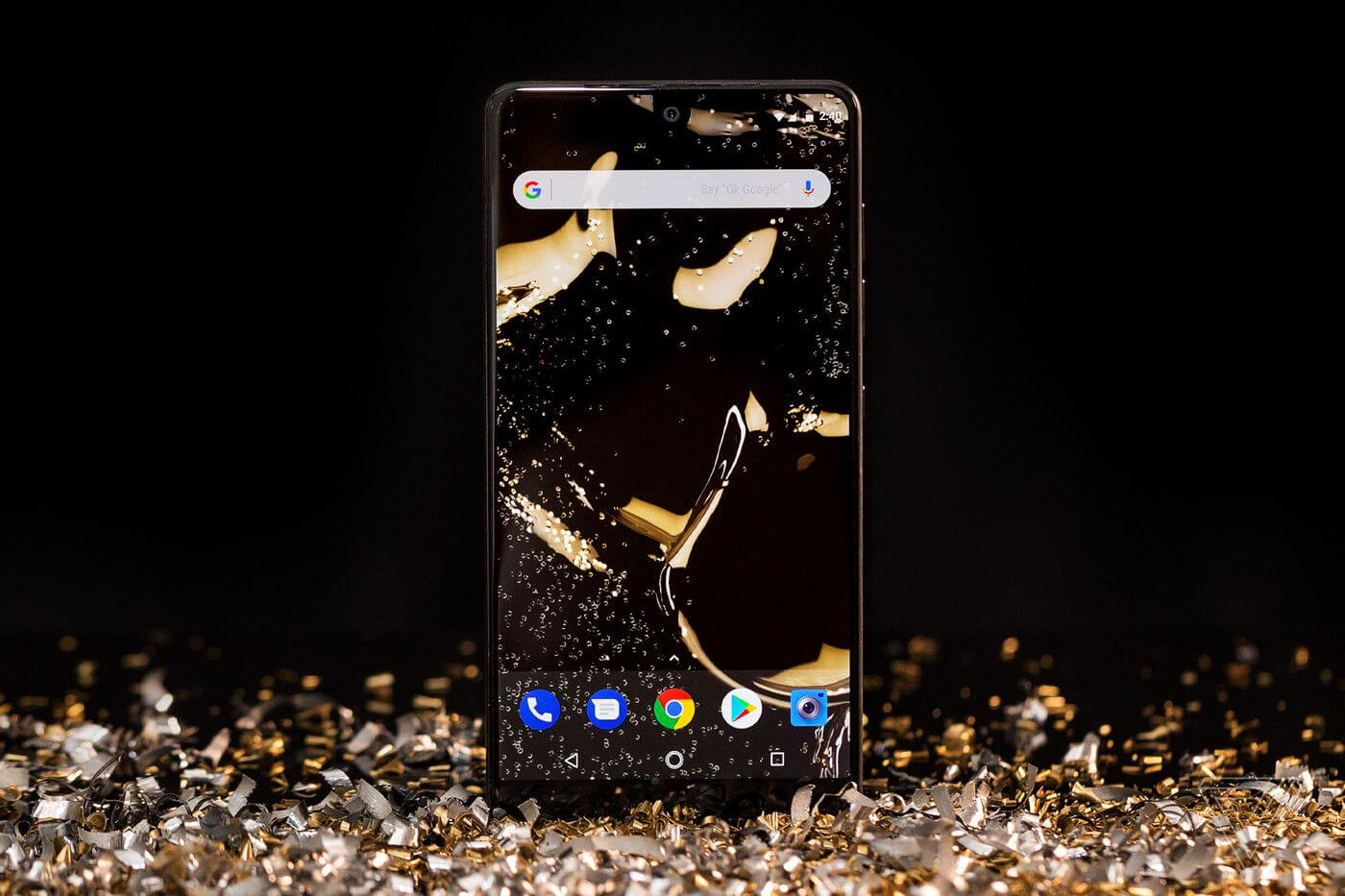
Essential reveals its second modular accessory: a magnetic headphone jack


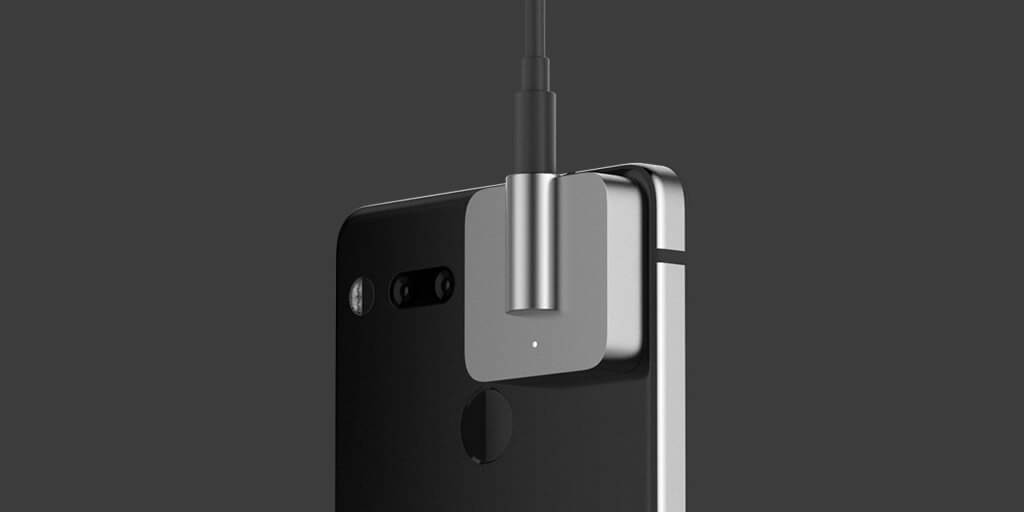
Last month brought the not entirely surprising news that Android co-founder Andy Rubin’s Essential company was in trouble, which makes today’s announcement a bit unexpected. The phone maker has revealed the second attachment module for the PH-1 handset, a magnetic 3.5mm headphone jack dongle, is on its way. It follows the 360-degree camera mod that launched alongside the phone in August last year.
Called the Audio Adapter HD, the module also features a built-in “audiophile-grade” amp “crafted from machined titanium for exceptional durability,” and a high-resolution ESS Sabre DAC (digital-analog converter).
Essential has announced that its handset is now Master Quality Authenticated (MQA) certified. A software update brings support for MQA, which give songs the lossless audio quality that artists intended without using up a huge amount of device space or cellular data.
The company also said it has teamed up with Tidal for a new partnership. The music streaming service has one of the largest catalog of MQA songs, and Essential phone owners can experience the new audio quality by signing up for three free months on its HiFi tier, which usually costs $19.99 per month.
The Essential Phone didn’t exactly set the industry on fire last year. In the six months following its release, the handset sold fewer than 90,000 units. While the established players offer a number of different handsets and have been around for years, that figure’s still a long way off what Apple and Samsung boast—both move about 75 million handsets each quarter. However, in addition to its recent price drop, Essential is giving people another reason to buy the PH-1 by offering a free pair of its USB-C earphones with the device. Normally costing $99, the Earphones HD will be bundled with the phone in a new $499 package.
No word on how much the Audio Adapter HD will cost, but Essential said it goes on sale later this summer. The 360-degree camera, the first Essential module, cost $200 when it launched. The future of the company may be uncertain, but it isn’t giving up on its handset just yet.

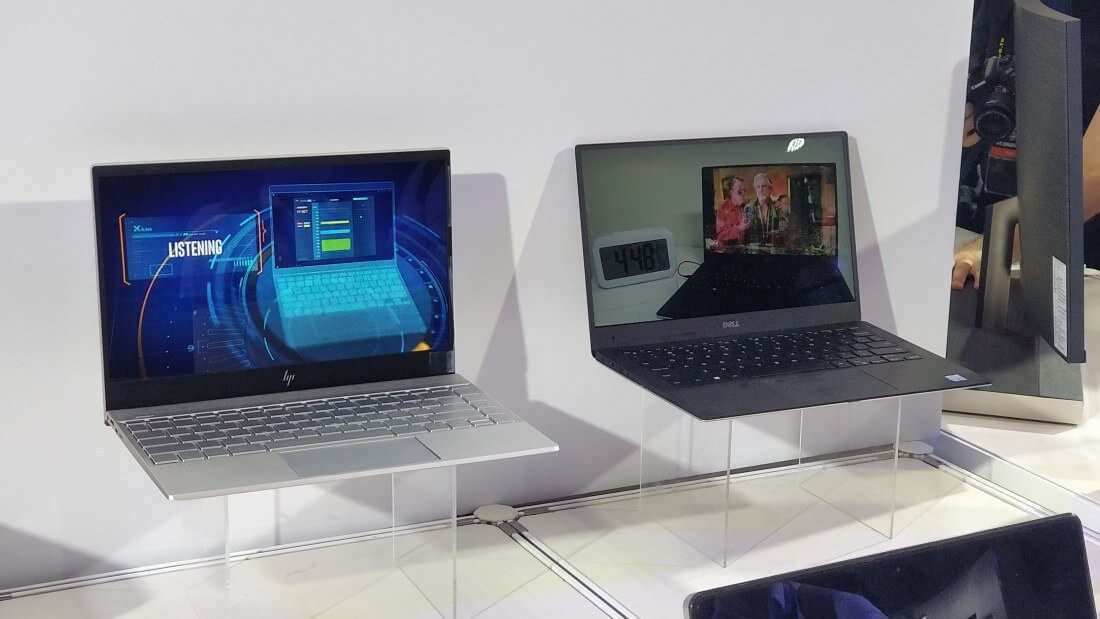
Intel's 'Low Power Display Technology' could solve your laptop battery life woes


Short battery life has been an issue for notebook owners for the better part of the last decade. Various device makers have tried to improve the situation by using weaker internal hardware, but no solution has been perfect so far. However, Intel's upcoming Low Power Display Technology could increase laptop battery life substantially.
Tired of draining your laptop battery mere hours after you've fully charged it? If so, you certainly aren't alone.
Whether you use a gaming machine or a standard notebook, most laptop owners have run into battery life problems on more than one occasion.
However, good news could be on the horizon now.
At Computex 2018 this week, Intel said it's working on a new type of notebook display panel, which utilizes something the company calls "Low Power Display Technology." The technology will supposedly only draw a single watt of power from a given laptop's battery.
According to PCWorld, this technology could increase a given device's battery life by as much as "four to eight hours."

It seems likely that some compromises will need to be made for LDPT to become a reality but it's tough to say where they might lie. The images we've seen of Intel's prototype devices so far don't give us an accurate idea of how much LDPT has negatively impacted their picture quality, if it's indeed had any effect at all.
That said, PCWorld says LPDT doesn't seem to change much about the displays on a fundamental level. The outlet reports the prototype devices' brightness looked about the same as any other consumer notebook, at about 350 nits.
If you're eager to get your hands on a device with LDPT, it sounds like you won't have to wait long. Intel says the first devices with this technology built-in will hit the shelves of your nearest electronics retailer as soon as this holiday season. Intel hasn't released any information regarding the devices' potential pricing as of writing.

May 29, 2018

Second generation Essential Phone canceled as company is put up for sale


The Essential Phone got off to a rough start with a price tag equal to flagships but without the polished user experience to come with it. Camera problems and software bugs that needed addressing explain many of the poor sales figures. Now, co-founder and Android creator Andy Rubin is exploring a sale of Essential Products Inc.
For those hoping to see a second Essential Phone, that plan has been canceled. There will not be a second phone produced by Essential as it stands today. Rubin Tweeted out, "We always have multiple products in development at the same time and we embrace canceling some in favor of the ones we think will be bigger hits."
Sprint was a large supporter of the Essential Phone and was trying to get a true flagship device exclusive to its mobile network. Now that T-Mobile has acquired Sprint, Essential had no carrier in the United States as a backer for a second generation.

Credit Suisse Group AG has been hired to advise on the company sale. So far, there is believed to be at least one potential buyer, although all involved in the negotiations have been unwillingly to publicly comment on the matter.
Ongoing discussions to buy the business are headed towards a total sale of all assets. Patents, employees and hardware products including an upcoming camera attachment and smart home device would all be part of the deal.
To date, it is estimated that Essential has sold approximately 150,000 units of its first generation phone. Although the sales are a drop in the bucket compared to Samsung, Apple and Google, the minimalist design philosophy of Essential has not been complete ignored.

May 12, 2018

Flipkart Big Shopping Days and Amazon Summer Sale is back in India


 Flipkart Big Shopping Days

Flipkart's Big Shopping Days is back in May 13th - 16th. This year it comes at the time of Big Deal for Flipkart. Everyone is now heard of the news about, U. S retailer giant Walmart is buying 77 % stake of Flipkart for 16 billion. Yes. The Indian e-commerce company is now becoming a foreign e-commerce firm. With deep pockets of Walmart, flipkart can now withstand the competition it faces from its rival Amazon in India. Another advantage of this deal is, Walmart already has wholesale stores in India. That will also help Flipkart in flooding customers with huge discounts for goods. And another shopping festival is starting on 13th may 2018.

While flipkart's rival Amazon India is trying to grab the Indian e-commerce market. Amazon India also has deep pockets of it's parent company Amazon.com Inc. owned by Jeff Bezos. Amazon grabbed the business of Walmart, which is through brick & mortar stores in the U.S, via its e-commerce platform. And Walmart is trying to retaliate with its Flipkart acquirement move. With the help of Flipkart, Walmart can counter it's U.S rival amazon Indian e-commerce.

 Amazon Summer Sale

Amazon.in is also conducting a shopping festival in the name Amazon Summer Sale in the same period of 13th May to 16th May 2018. Everyone is watching these shopping festival keenly. We hope the tough the competition in e-commerce will help the consumers at the end.

Compare Flipkart Big Shopping Days offers here and Amazon Summer Sale offers here.
Let us know your opinion in the comments.

Apr 26, 2018

These top VPNs can help you secure your web traffic, at the best possible speeds


The Internet has become an essential tool for our daily lives whether you want to find information, do business, stay connected with friends and family, and the number of things you can accomplish keeps growing every day. However, the technological advancements that have granted us this level of connectivity haven't come without a few privacy risks. ISPs, governments and various other third parties have ways of tracking what you do online to some degree.
While many of these groups likely won’t use the information they gather about us for anything nefarious, the risk remains. Following the recent controversial repeal of 2015's Title II net neutrality protections, these protections not only prevented US ISPs from blocking content and dividing the internet up into “fast lanes” and “slow lanes” but they also contained a few important restrictions regarding the types of information your ISP could gather about you. Depending on where you reside, other similar restrictions or contradicting laws could play an important role in determining how private your online presence really is.
Now, virtual private networks, or VPNs for short, are currently the best way to keep your online browsing habits private and to secure your web traffic. You can use a VPN as a tool for staying anonymous online and potentially bypassing future content restrictions.
For the unaware, whenever you connect to an online website or service, you’re sending a request to a host’s server for the piece of content you’re attempting to access. This is a fairly straightforward process on paper, but it’s far from perfect -- hackers can potentially intercept this request and gather information you may have sent, such as payment information, your birthday or your address. That is why HTTP Secure is so important and thankfully fully mainstream by now. But how about when using a public network like a coffee shop's Wi-Fi hotspot? Furthermore, some online content can be blocked by your ISP or other third parties based on your location.
With a VPN, however, your web traffic is given an extra layer of security and anonymity. VPNs route your web requests through an encrypted tunnel to a server run by the VPN company you signed up with. After the request hits their servers, it’s then sent out to to the internet as usual. This means that your IP address -- which is often gathered and used to determine your general location -- and other information is effectively obfuscated.
This layer of protection often comes at the cost of speed, but that’s a price many are willing to pay for increased security. It's also worth noting the speed impact a VPN may have can be mitigated by selecting the right service.
There are dozens, if not hundreds, of options out there and some are certainly faster and more reputable than others. PCMag periodically tests VPNs for performance as well as factoring in other features like type of encryption used, transparency, ease of use and support. Their most recent roundup lists the best VPNs available today on a comprehensive comparison.
When we test VPNs, we use the Ookla speed test tool (see how we test). This test provides metrics for latency, download speeds, and upload speeds. (...) Using that measurement, PureVPN is the fastest VPN by far. It's followed by the aptly named ExpressVPN and IPVanish VPN. But networks can be fickle things and your mileage may vary.
Speed is one of the key factors to consider, but not the only one. We've rounded up top five VPN choices based on PCMag's tests along with our own impressions based on personal use over the past few months.
PCMag awarded their 5/5 rating to NordVPN, applauding the service for its clean interface and excellent collection of features. NordVPN is priced at $11.95/month or $79 for a two-year plan. We managed to get a better offer for longer-term subscriptions, securing a $2.75/month rate if you subscribe for three years ($99 total).
PureVPN which was listed as the fastest service on the roundup has a similarly aggressive deal going on at the moment: $2.87 per month on the 2-year plan, and a 7-day money back guarantee.
We have recommended IPVanish in the past and we're glad to see it doing so well in PCMag's speed tests. One of their differentiating features is app support for Amazon FireTV and Kodi streaming. They're currently $5.20/mo when signing up for a year.
PCMag’s runner-up Private Internet Access (PIA) is a simple, affordable VPN for “power users.” PIA will run you $69.95 for a two-year plan ($2.91 per month). I can attest to PIA’s performance myself; I use it regularly and haven't yet noticed a significant speed decrease while browsing the web or watching Netflix.
We've also used ExpressVPN extensively on desktops and mobile devices with great results. Lately they've been touting bypass of Netflix's geo restrictions to access all the content offered in the US when connecting to their VPN.
Finally, we should mention there are some free VPN alternatives. We wouldn't use these permanently because of speed and data caps on free plans, but for ocassional use we've had good experiences with both Windscribe and Tunnelbear.

Opera's new Touch mobile browser makes one-handed web surfing easy

While “one-handed web browsing” might sound like a euphemism for a popular internet-based activity, many phone owners would prefer being able to surf the web without requiring both hands, especially while out and about. Step forward Opera and its new Opera Touch browser.
"We have moved the browser’s key functions within your thumb’s reach," said Opera's product manager, Maciej Kocemba. ”This means that, unlike in most other browsers, you can more easily browse and search the web when on the move."
One of Opera Touch’s design elements is the “Fast Action” button at the bottom of the screen that lets users easily access certain features, such as the tabs. Additionally, the browser opens directly into search with the keyboard activated, ready for you to type in a URL or query. It also supports voice search and comes with Opera’s ad blocker and protection against cryptojacking.
Another feature of the Touch browser is a synchronization tool called Opera Flow. It allows users to share information between the Opera desktop browser—version 52 launched today—and the mobile browser. All you have to do is establish a connection by scanning a QR code from the desktop using Opera Touch. While most mobile browsers have some form of syncing tech, Opera says 69 percent of people don’t use the feature as they take too long to set up, preferring instead to email links to themselves.
Once set up, a “Your Flow” section appears in the browsers, letting users send content straight to the other device. It also comes with end-to-end encryption.
Using Flow does require the use of the Opera desktop browser; it’s unclear how many people would be willing to give up market leader Chrome for the feature.

Apr 14, 2018

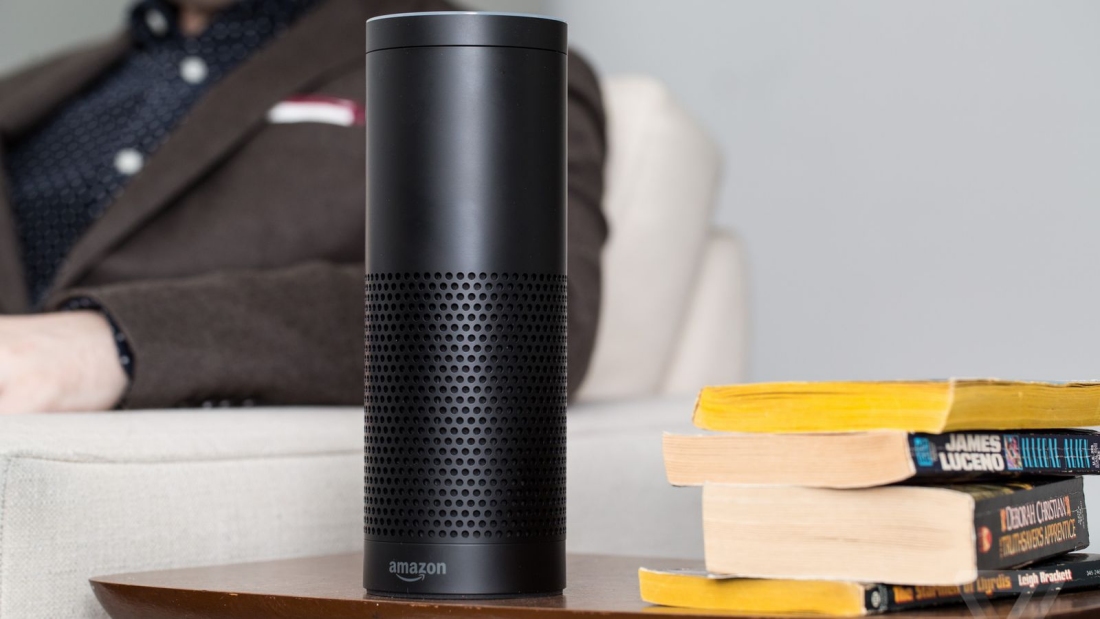
Amazon patent could let Alexa listen in on conversations and discover your tastes


Soon after Mark Zuckerberg was once again forced to deny that Facebook secretly listened in on users’ conversations to improve ad targeting, a recently filed Amazon patent was discovered that appears to perform a similar function.
The patent describes how Amazon’s digital assistant, Alexa, could listen out for certain trigger words, such as “love,” “like,” and “hate,” that will help it ascertain a user’s preferences and dislikes—very helpful when it comes to targeted ads. “One or more sniffer algorithms or processes can attempt to identify trigger words in the voice content, which can indicate a level of interest of the user,” states the document.
While the technology may be used to expand an Amazon user’s profile and discover what advertisements might be of interest to them, it could also see Alexa acting without first being prompted. “If the user mentions how much the user would like to go to a restaurant while on the phone, a recommendation might be sent while the user is still engaged in the conversation that enables the user to make a reservation at the restaurant,” suggests the patent.
Such abilities do raise a multitude of privacy concerns, particularly at a time when the practice of tech companies spying on their users is under the spotlight. But as with all patents, there’s no guarantee that this one will ever become a reality.
“We take privacy seriously and have built multiple layers of privacy into our Echo devices,” Amazon said, in a statement to the BBC.
"Like many companies, we file a number of forward-looking patent applications that explore the full possibilities of new technology. Patents take multiple years to receive and do not necessarily reflect current developments to products and services."
Earlier this week, Mark Zuckerberg assured Sen. Gary Peters that Facebook did not secretly use device microphones to record users as a way of serving them appropriate ads—a conspiracy theory that’s been around for years.

Mar 28, 2018

Mozilla's new 'Facebook Container' extension aims to prevent Facebook from monitoring your web activity


In the wake of the Cambridge Analytica data privacy scandal involving Facebook, it's perhaps understandable to see the #DeleteFacebook movement picking up steam. Indeed, even Elon Musk got in on the action by hiding both Tesla and SpaceX's respective Facebook pages after being challenged to do so via Twitter.
However, for many users, total account deletion is off the table. Plenty of loyal Facebook users consider the platform an essential part of their day-to-day lives. Fortunately, if you're one of those people, you aren't completely without recourse if you want to prevent the platform from harvesting your data.
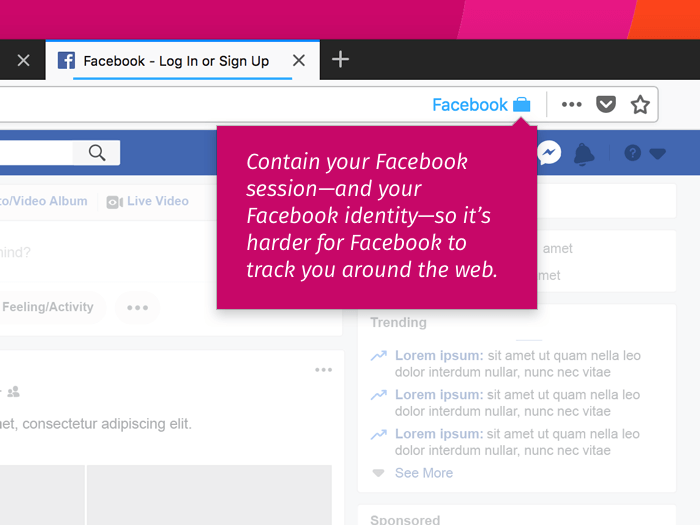
Browser maker Mozilla is stepping up to help by offering a new, official extension called "Facebook Container." At its core, the extension simply creates a blue browser tab that "helps you take control and isolate your web activity" from Facebook. It does this by isolating your Facebook session from the rest of your browser activity, theoretically preventing the platform from harvesting data on your web browsing habits.

It should be noted that while Facebook Container will prevent Facebook from gathering web browsing data, it will not prevent the platform from monitoring and storing data about what you do while on Facebook itself. The posts you like and the comments you leave on the platform will likely continue to be monitored for the foreseeable future.
At any rate, this isn't the first time Mozilla has taken action against Facebook. The organization has made their frustration with Facebook known in the past, opting to pull their ads from the platform shortly after the Cambridge Analytica incident gained significant media attention.

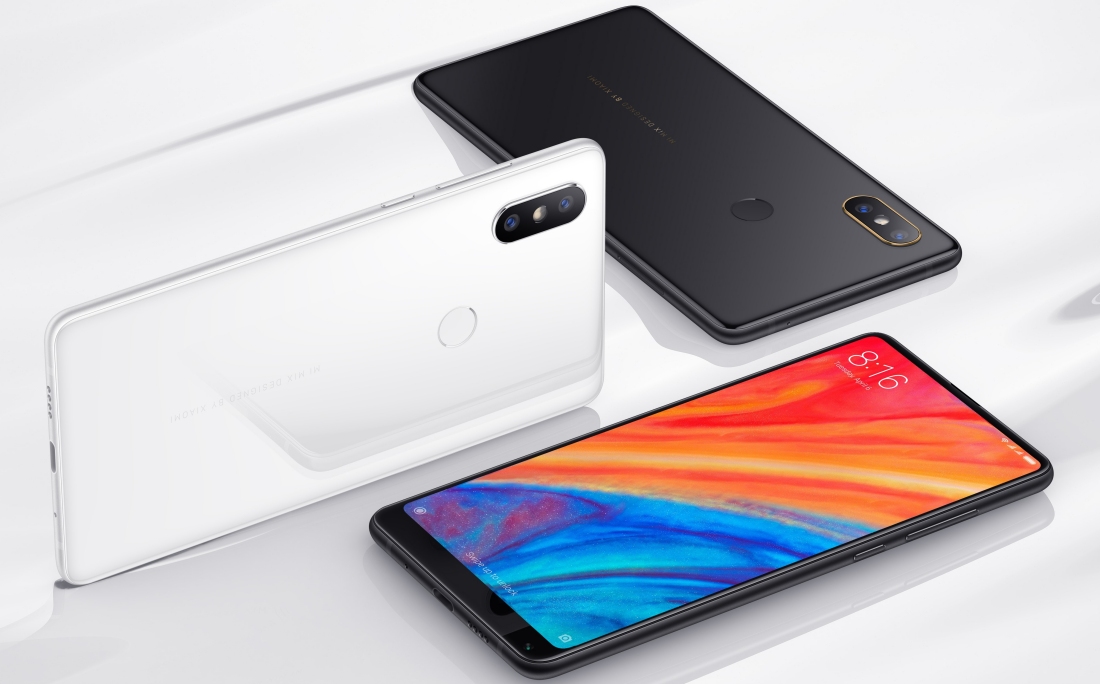
Xiaomi unveils flagship Mi Mix 2S with dual rear cameras


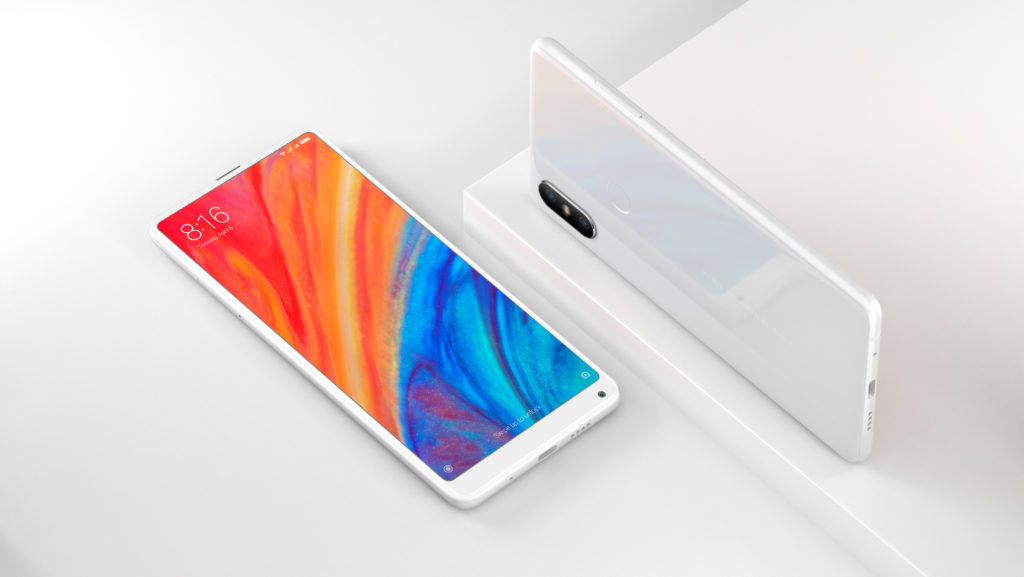
Xiaomi on Tuesday at a media event in Shanghai unveiled the successor to last year’s Mi Mix 2. The Xiaomi Mi Mix 2S offers a number of compelling features at roughly half the cost of current high-end handsets.
Xiaomi’s new flagship features a 5.99-inch IPS LCD screen (DCI-P3 color gamut) boasting a resolution of 2,160 x 1,080 pixels. It’s driven by Qualcomm’s Snapdragon 845 SoC alongside Adreno 630 graphics and can be configured with up to 8GB of RAM and 256GB of local storage.
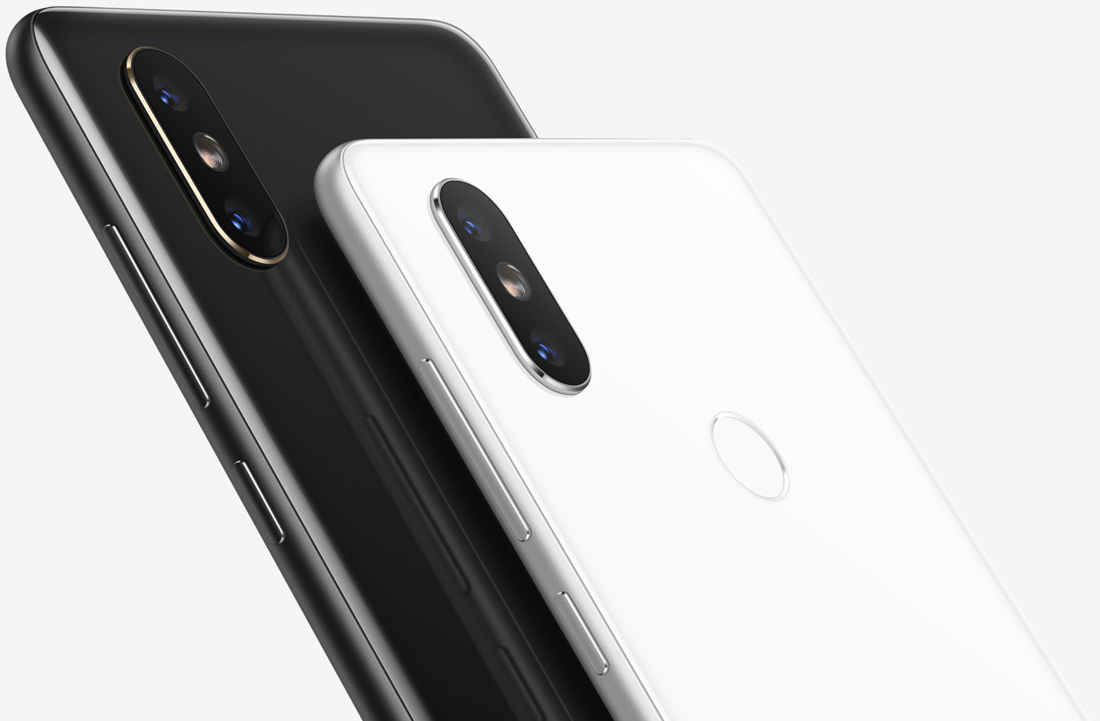
The real star of the show, however, is the rear camera array.

The dual camera setup utilizes Sony’s IMX363 sensor technology with 1.4μm pixels. DxOMark described the phone as a “Chinese gem” and offered the following insight about the camera system:
The dual camera setup utilizes a 1/2.6-inch sensor aligned with a wide-angle 26mm equivalent lens that boasts an optical image stabilization (OIS) system. The second camera utilizes a smaller 1/3.4-inch 12MP sensor combined with an equivalent 46mm telephoto lens, but there’s no OIS on the Mi MIX 2S’s telephoto lens.
The Mi Mix 2S earned a photo sub-score of 101 which Xiaomi says is the second-highest ever photo score for a smartphone camera.
Other noteworthy features include a 3,400mAh battery with 7.5W wireless charging that supports the Qi Wireless Charging standard, USB Type-C connectivity, a 5-megapixel front-facing camera and a rear-mounted fingerprint sensor. It’ll ship running MIUI 9 on top of Android Oreo.

Xiaomi’s Mi Mix 2S launches on April 3 starting at RMB 3299 (about $525) which gets you 6GB of RAM and 64GB of storage. You’ll pay a bit more – RMB 3999, or roughly $636 – for the high-end model with 8GB of memory and 256GB of local storage. It’ll be available in China first before rolling out to other markets.

Mar 14, 2018

IKEA partners with TaskRabbit to launch in-home furniture assembly service


If you've purchased IKEA furniture in the past, you probably already know how difficult it can be to assemble. If their latest announcement is anything to go by, it seems IKEA finally understands that as well.
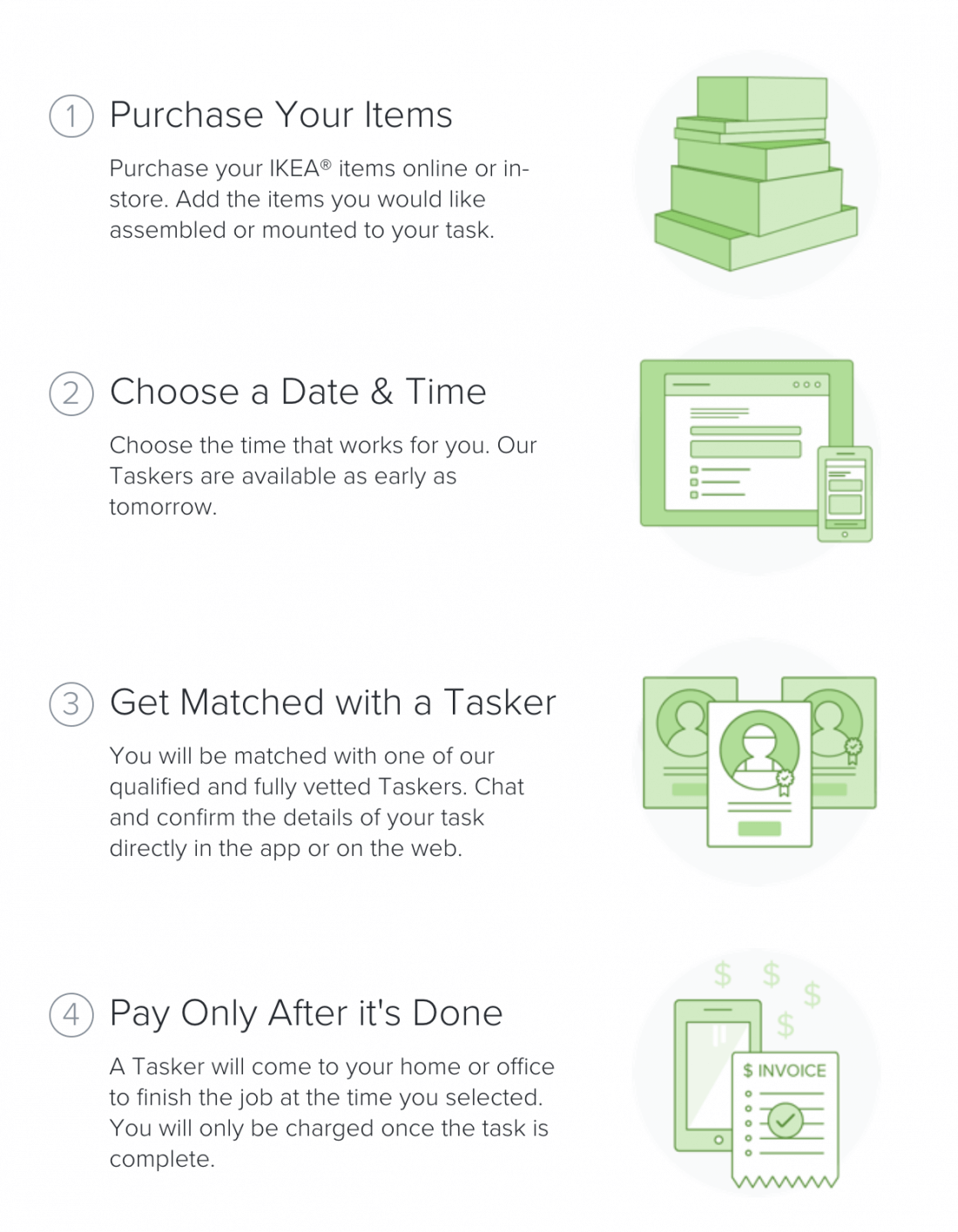
As reported by TechCrunch, the furniture company today announced the roll-out of their new assembly service developed in partnership with TaskRabbit. The service, simply dubbed "IKEA Assembly & Mounting," will let you pay extra to allow TaskRabbit "Taskers" to enter your home and assemble any given piece of IKEA furniture for you.
According to IKEA, customers who choose to take advantage of their new assembly service will be able to choose a specific date and time for the assembly to take place. If you're worried about getting scammed, IKEA promises you'll only have to pay once the job is complete and all Taskers are "qualified and fully vetted" prior to being sent out to assist you.
As far as pricing goes, IKEA's new assembly service will start at $36 with users being charged a "flat rate per type of item." To determine how much your specific piece of furniture will cost to assemble, simply download the TaskRabbit app for iOS or Android and add the items to a new task.
As TechCrunch notes, IKEA's new assembly option is likely the company's answer to Amazon's similar in-home furniture assembly service. Still, as nice as the service sounds, some users may be a bit leery about allowing strangers into their homes.

Feb 17, 2018

Google removes 'View Image' button from image searches


If you tend to take full advantage of Google's image search functionality, you may be in for a bit of bad news. According to Google, the "View Image" link in Google Images has been removed following a recent legal settlement between Google and Getty Images.
For the unaware, Google's View Image button used to allow users to view a given image without needing to actually visit the website it was being hosted on. This feature was beneficial to virtually everyone but it was particularly handy for those with tighter data caps who prefer not to load entire websites to view a single image.
In addition to the View Image button's removal, it seems the resolution search button has also disappeared. Previously, it was possible to click on a given image's resolution text to be whisked away to another search which listed all occurrences of that image throughout Google, at different resolutions.
Since announcing these changes yesterday, Google has elaborated on their reasoning behind the move. "Ultimately, Google Images is a way for people to discover information in cases where browsing images is a better experience than text," the company said. "Having a single button that takes people to actionable information about the image is good for users, web publishers and copyright holders."
The company also confirmed their decision was due at least in part to their previously mentioned settlement with Getty Images.
Regardless of their intentions, many users are upset with Google's latest decision.
Fortunately, some of these users have already taken action by creating an open-source extension which adds the View Image button back in. The extension, appropriately dubbed "Make Google Image Search Great Again," is available to both Firefox and Google Chrome users.
If you want the source code itself, simply visit the extension's GitHub page. It is worth noting that the extension does not seem to re-add the resolution search functionality.
If you'd prefer not to use an extension to re-add View Image functionality, you aren't entirely without recourse. As Ars Technica notes, Bing, DuckDuckGo and other search engines still offer similar functionality if you're willing to ditch Google.